Tonight’s dinner, already in your day.
Your day, set out before you open it, with dinner from your own recipes.
Your day, already set out.
Designed. Arrives during the beta.
Open Carly and today is there: what’s on, what’s due and tonight’s dinner, with up to three things that matter most.
On a full day, Make today lighter suggests what could move. At night, close the day: what’s done stays done, and nothing turns red.
Ahead brings the dates that come round each year, like a passport or a birthday, into your day in good time.
Dinner, from your own recipes.
Designed. Arrives during the beta.
Save a recipe from a post, a web page or a photo with Save to Carly, then choose tonight or another day.
Tonight’s dinner sits in your day with the time to start and anything to do first.
The shopping list goes to Apple’s Reminders app. If you live with someone, they can tick it off on their iPhone with nothing to install.


A journal that asks nothing back.
Built. In testing now.
Type a line, add a photo or say it out loud. No streaks, no scores and no AI unless you ask.
Now and then, Carly gives your words back: your first month, and later, one year, kept.
Nothing you write is shared unless you choose to. You can lock the Journal with Face ID.

Help that waits for your yes.
Built. In testing now.
Tell Carly what’s going on, like “Plan my week”. It drafts a plan with a tick beside each item, and nothing changes until you say yes.
Turn Ask Carly off and the rest of Carly still works.
You said: Busy week: Pilates on Tuesday, Sam’s birthday on Friday. Plan around it?
Carly replied: Here’s a shape for your week. Untick anything you’d rather not.
Why it’s one app
Each part knows about the others. That’s the point of having them in one place.
-
-

-

-

-

-



Morning
- Take the chicken out
- Dentist
Evening
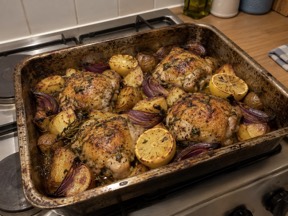
- Tonight: Lemon and herb chicken traybake
- Return the library books
Design preview. Try it: choose Tonight on another recipe. Nothing is sent.
- SundayAsk Carly drafts three dinners from your recipes, around your week. Thursday’s late meeting gets leftovers. You tick two.
- SaturdayA dinner you loved becomes a line in your Journal, if you want it there.
What Carly won’t do
- Count or score your food. No streaks in Food, ever.
- Show you a miss. Nothing turns red or piles up as overdue.
- Sell your data or show you ads.
- Lock your recipes away. Read or export them any time, even after you stop subscribing.
What happens to what you write
- Your journal is encrypted on your iPhone, and you can lock it with Face ID.
- Ask Carly reads your journal only if you allow it. When you ask about your journal, the passages it needs go to Gemini, Google’s AI model, in the European Union. Once sent, they’re outside your journal’s encryption.
- This website sets no cookies and uses no trackers.
Questions
Do I pay for the beta?
No. The beta runs on Apple’s TestFlight, which doesn’t take payment.
What will it cost?
Carly will be a subscription, starting with a 7-day trial. We’ll publish the price here before launch.
Is there an Android, iPad or Mac version?
Carly starts on iPhone. iPad comes later. There’s no Android or Mac version.
Can someone without an iPhone use the shopping list?
The list is shared through Apple’s Reminders app, which needs an iPhone, iPad or Mac. Someone without one can open it at iCloud.com in a browser with an Apple Account, or you can send the list as a message.
Can I turn Ask Carly off? Is there a limit?
Yes, you can turn it off under You › Ask Carly, and the rest of Carly still works, though drafting a week of dinners needs it. When it’s on, it answers up to 40 messages a day.
Is Carly a person?
No. Carly is the app’s name. Ask Carly is the part that drafts plans, and it shows you everything before anything changes.